Commute to Work
A co-op, first-person train game that runs in the browser: drive, check tickets and keep a real commuter train running on a 57 km route rebuilt from OpenStreetMap, with one set of controls that works on mouse and keyboard, an Xbox controller, or a phone or iPad, where the touch controls are designed so the whole game can be played one-handed.
Commute to Work is a co-op game about the morning train into London: the 07:12 from Gillingham to St Pancras over HS1, as the title screen puts it. Everyone joins the same train from a browser tab. One person drives, someone else grabs the handheld ticket machine and walks the carriages shouting “Tickets please!”, and somebody ends up cleaning the toilets or climbing onto the roof to fix a blown pantograph.
I started small: a walkable 3D train that two people could share, just to prove the shared part worked. Four days and 148 commits later it was this. The route is rebuilt from real data, but the design problem underneath it all was controls you could pick up without a manual.
Most of what follows came from playing it with my partner and my parents and fixing what they ran into. Most sessions went the same way: play a run, note what annoyed us, change one thing, play again.
Tickets please
I wanted the people who aren’t driving to have a real job too, not just ride along. The guard’s job became its own little loop, and like everything else it happens in the world rather than in a menu.
You take the ticket machine from its dock in the cab and walk the carriages. While you’re holding it, passengers you haven’t checked yet glow softly, more strongly when you aim at one. Click one and the handset shows VALID, a green tick appears over their head, and the count goes up towards everyone on board.
The ticks only show while you’re holding the machine. A player joining mid-journey gets the list of who’s already been checked, and it resets every journey. On a controller or a phone there’s a button to shout “Tickets please!”.
The cab is the interface
I wanted driving to feel like sitting in a real cab, so there’s no HUD. Everything lives on the desk in front of you, and you use it by looking at it and clicking: a power and brake handle you drag, labelled switches, a horn, an emergency brake, and screens that do the job a driver actually needs.
I built the screens around one question: what do I need to do soon? The speed screen pairs the dial with the current limit and a strip map of the line. The “next up” screen shows the next speed board with a countdown, then the upcoming stations against the timetable, with door cameras and carriage load around the edges.
The first desk took a string of small fixes: controls hidden behind the model’s dashboard, labels too big, a desk at the wrong height. Rather than keep nudging numbers in code, I built a simple edit mode, sat in the driver’s seat, dragged each control to where my hands and eyes expected it, and baked that layout back in.
The same habit ran through the rest of the train. A swinging cab door kept getting in our way in play, so I swapped it for a sliding one. When fixes to the train model started piling up as workarounds in code, I stopped and fixed the model itself in Blender instead.
Jobs on the way in
The run takes 44 minutes, and I wanted something on the train to always need a person. The tools hang on the walls, and you carry one at a time, so the group has to split up.
DriverKeep to the timetable, stop on the mark and work the doors. Change power supplies at the right places on the line, because getting it wrong, or running far too fast, blows the pantograph.
GuardCheck every ticket before St Pancras. The train fills up after Ebbsfleet and thins out at Stratford, so the rush comes in the middle.
CleanerThe toilets get worse as the journey goes on, until a filthy room ends with a blocked toilet. A mop, a plunger and a new loo roll fix it.
FixerWhen the pantograph blows, make it safe, put the fire out, climb onto the roof and hammer it straight. Forget to cut the power and you're zapped off, and in a tunnel you have to lie flat.
HostThe first to join picks the starting station and the weather, and can start a new journey for everyone. Late joiners appear next to the host so nobody gets left behind.
I kept real-world detail where it gives a player something to do. The station layouts follow the operator’s published plans, stops at the busy stations last longer, and the power changeover is a real part of driving the line. At St Pancras there’s no end screen: get off and look around, or drive back out from the other cab.
Then I tuned the faults by playing them. The pantograph first blew if you broke any local speed limit, which felt random rather than fair. I wanted a blown pantograph to be something you caused, so now only a real electrical mistake or running far too fast does it. The train also couldn’t quite reach line speed in testing, so I gave it more power.
The blocked toilet turned up far too early, so it now only comes once the room is already a mess. And I cut the passengers back after more than 300 piled on at Ebbsfleet, because the guard’s job had to be “more manageable, especially when we have to count all the tickets”.
My partner kept wanting to hit the passengers with the mop out of frustration, so now you can, with a knockback and a grumble like hitting a villager in Minecraft. When she fell off the train and I couldn’t go back for her, I made the back cab drivable so you can reverse.
Playing solo needed its own fix. The autopilot drives with the same controls, so one player can leave the cab and check tickets, and touching any control takes it back. Driving got polish from testing too: the power handle shook with the train, which made it hard to pick a speed, so I steadied your hand on the handle without hiding the train’s motion.
One game, three kinds of input
I wanted anyone to be able to join with whatever they had to hand: a mouse, a controller, or fingers on glass. Each got its own design pass rather than one scheme translated to the others.
Mouse & keyboardLook and click what's under the crosshair, with hints that name the key. Running is a double tap like Minecraft, to match pushing the controller stick all the way.
Xbox controllerOne button uses whatever you're looking at, and hints switch to Xbox button badges as soon as you pick up a pad. A blank name joins as a guest, because typing with a pad is a pain.
iPhone & iPadHold WALK to go where you're looking, drag to look and tap things to use them. Every other action gets its own big labelled button.
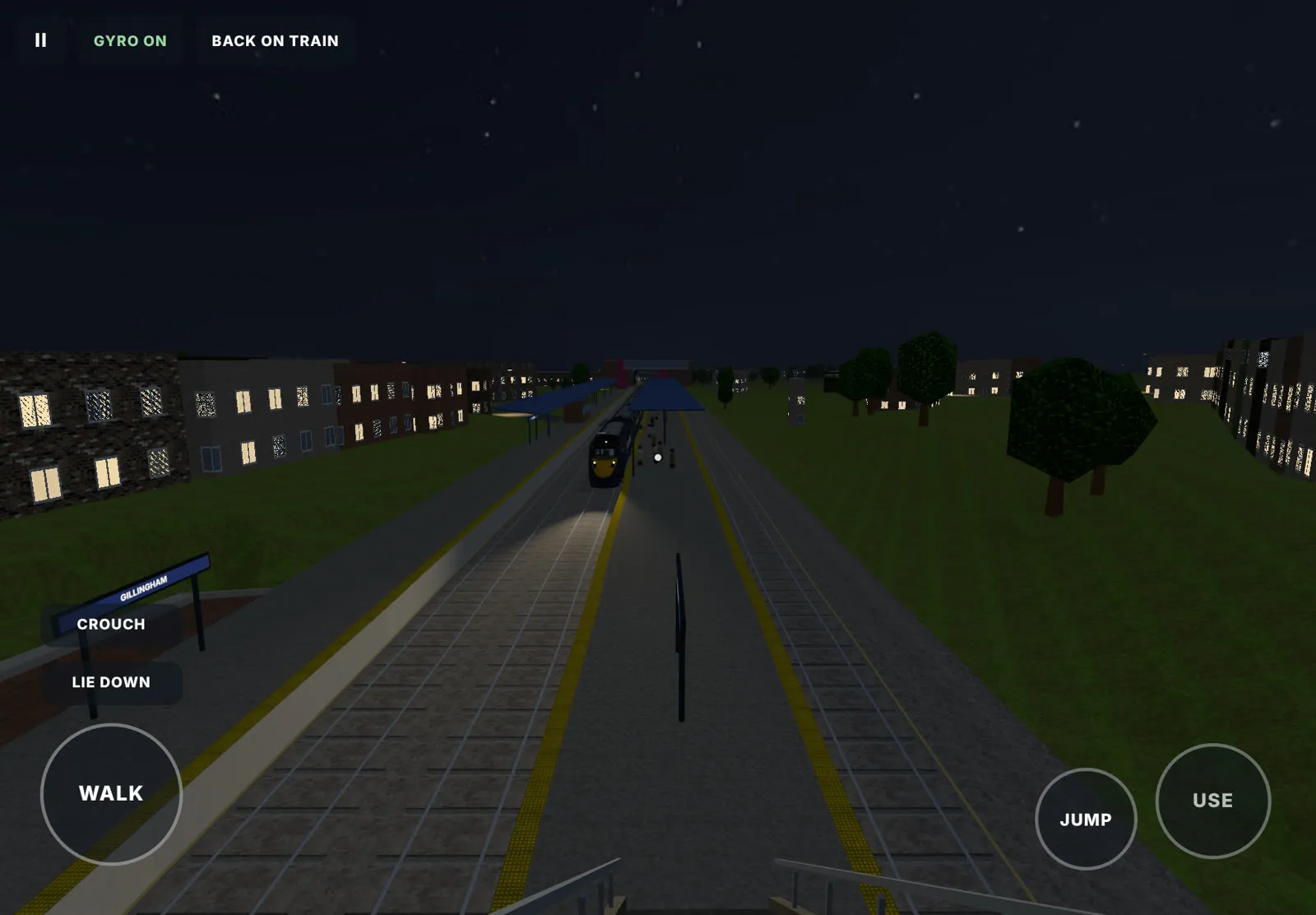
Touch controls you can play one-handed
I first added touch so my dad could ride along on his iPad and press the autopilot. I expected it to be an afterthought. It turned into the part of the game I designed most carefully, and most of that came from taking things away.
Most mobile shooters and explorers copy a controller onto the screen: a fake analog stick under one thumb, a look area under the other, so you need both hands and a lot of precision. My first version did the same, because that’s how Call of Duty Mobile does it.
Then I watched my parents play. They couldn’t get from the platform onto the train without falling off, and I was fairly sure the stick was the problem. So I made the pivot: I replaced it with a single hold-to-walk button, with no running. There’s no stick to slip off and no speed to manage. You just go the way you’re looking.
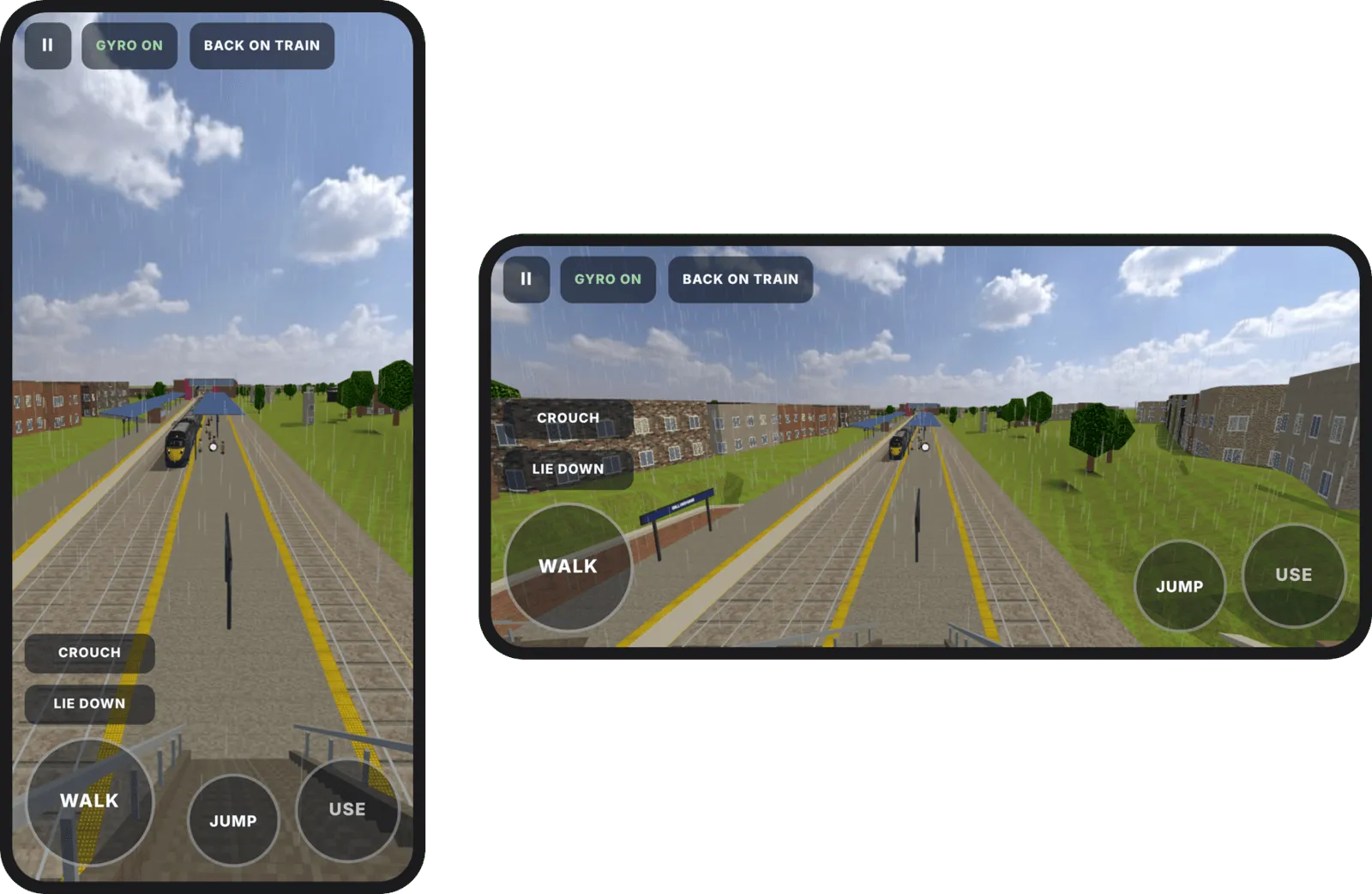
Looking works two ways, and you can mix them. Drag anywhere on the screen to turn, or just move the phone: the view follows the device one-to-one, like AR. That makes small, precise looks, like lining up the power handle or aiming at a passenger’s ticket, much easier than nudging a thumb.
My first gyro felt inverted and slow: spinning a full circle on a swivel chair only turned me a few degrees. So I rewrote it. The combination surprised me on my phone: a quick swipe to turn, the gyro for fine adjustments, and a finger left free to walk and press things.
With one button to move and the gyro to look, the whole game can be played end to end with one hand, from the platform to St Pancras. I don’t think many games manage that, and it’s the part of this project I’m proudest of as a designer.
Smaller fixes came from playing it. A SIT DOWN button appears when you aim at the toilet, because there’s no E key on a screen. On phones the buttons sit closer to the screen edges so thumbs reach them, and field of view is saved separately for upright and sideways, because a phone held upright needs a wider view.
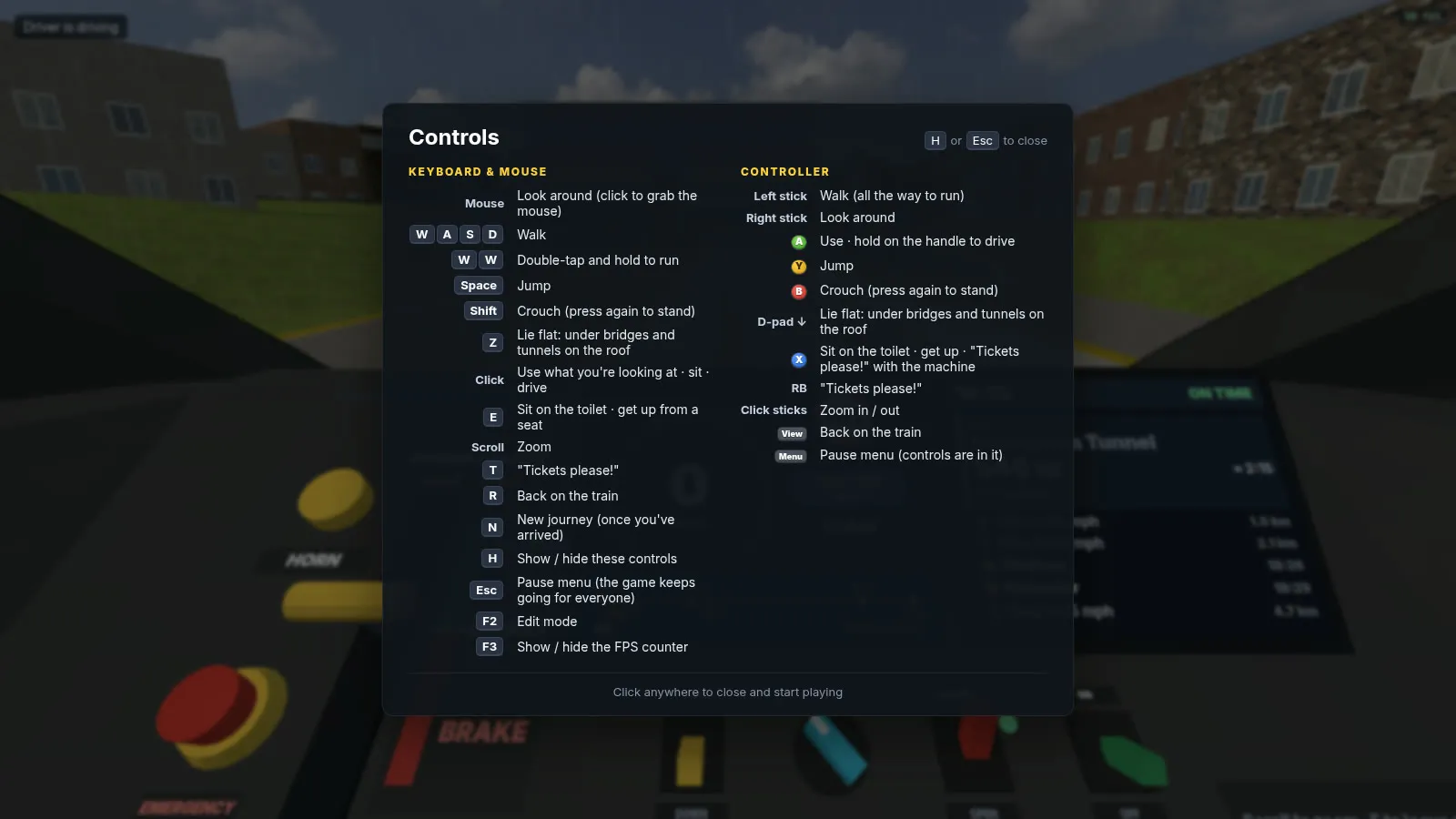
The controls card pops up at the start of each journey, written as actions (“Back on the train”, “Lie flat: under bridges and tunnels on the roof”) rather than a list of bindings. The pause menu keeps the game running for everyone else, because in a co-op game one person pausing shouldn’t stop the train.
Making it run on an iPad
Getting it onto iPads was mostly a performance problem. The first obstacle was phones and iPads crashing on load, because every carriage was loading its own copy of the train’s paint job. Loading each texture once fixed it.
Then my mum’s iPad ran fine while my dad’s older iPad Air dropped to 5 fps. The browser was drawing every piece of the train and world as a separate job, so I glued together everything that never moves, which more than halved that work. I also shrank the download to about a fifth of its size.
The graphics setting in the pause menu defaults to automatic, so nobody has to find it to make the game playable. It drops to low by itself if the device can’t keep up, then tells you where to change it back. It isn’t finished: my iPhone runs smoothly but hot, and an older iPad Pro still dips.
How it’s built
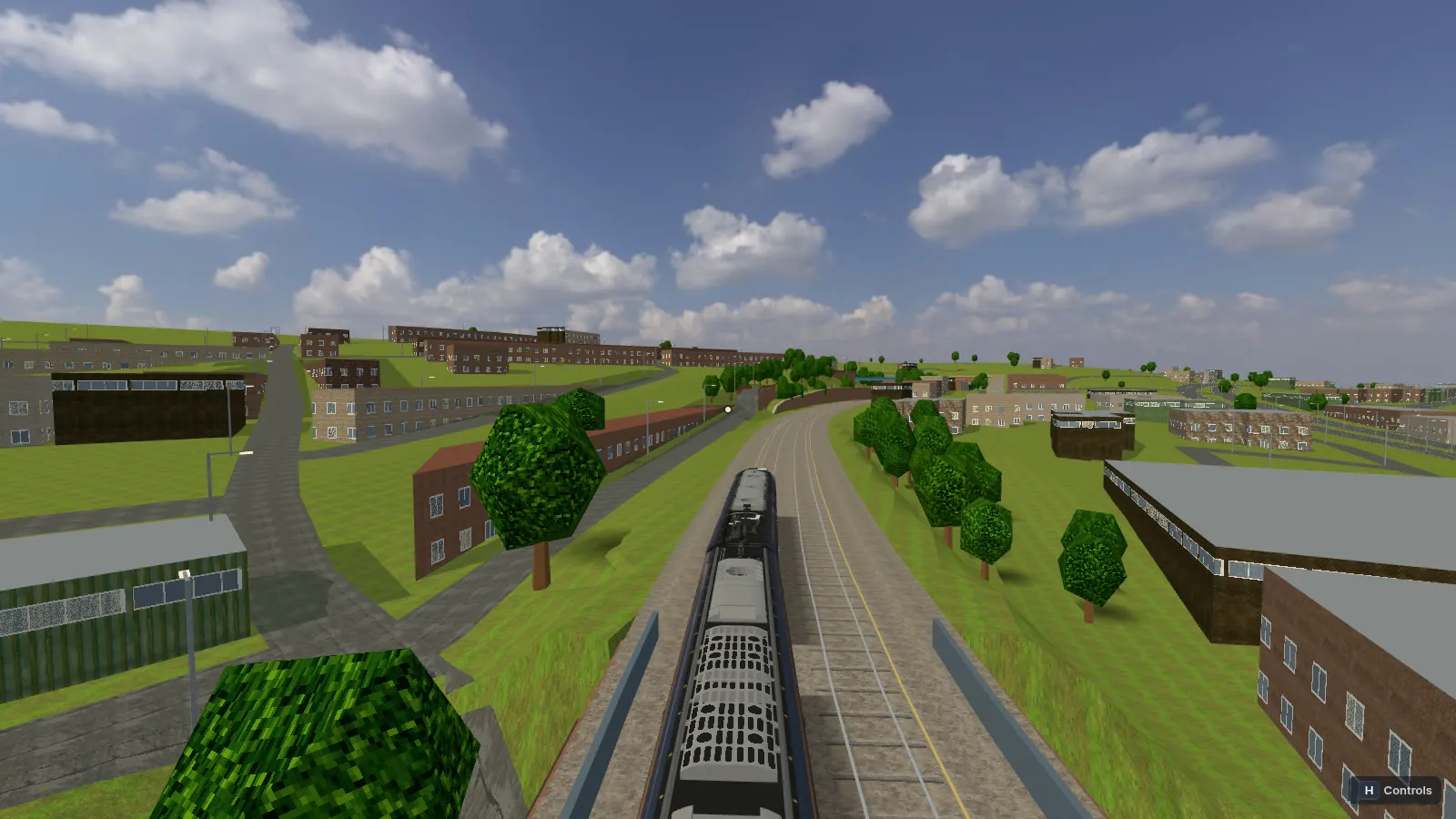
It’s Three.js in the browser and a small Node server. The server owns the game state (the train, the doors, the timetable, who’s driving) and each browser draws it, so everyone is always on the same train. It runs on a single Fly.io machine on purpose, since the game lives in the server’s memory, and it stops when nobody’s playing.
The route comes from OpenStreetMap: track, stations, roads, rivers, bridges and tunnels across 8 stations and about 57 km. Real height data shapes the cuttings, embankments, viaducts and tunnels. The look is deliberately blocky, with photo textures pixelated Minecraft style.
Where it’s at
It’s playable end to end: start at any station in sunshine, cloud, rain or at night, run the timetable to St Pancras with passengers boarding at every stop, and hand the driving to the autopilot when you’d rather check tickets. My first autopilot left the doors open, then ran flat out past stations and speed limits, so I rebuilt it to take over safely at any point.
I haven’t released it as a public game, and I only share it with people I know. I renamed it from High Speed 1 to Commute to Work so it doesn’t lean on real branding if it ever goes public. The train model in these screenshots is a temporary stand-in from a community mod, used for private testing only. I’ll buy a proper licensed model once the game is far enough along to release, but until then it isn’t worth the cost.
Development is paused for now, because I want the next version to be a big step up rather than more of the same. Since this, I built Grand Theft Medway, and what I learned there changes how I’d make this. The towns along the line would be built from the same procedural house kit, with real house types laid out by rule instead of generic blocks.
For the stations, I want to capture the real ones as Gaussian splats, a kind of 3D photo scan, and use them as the reference to model each station properly, so arriving at a platform looks and feels like the real place. I already have an Insta360 camera, so the plan is to take it round the stations along the line one day and capture them myself.
I’ll also port it to Godot, like my other games. The browser got it onto phones and iPads with no install, which mattered for playtesting with family, but it’s also what made performance such a fight. A native engine gives me streaming, level of detail and far more headroom for a world this size.
The most useful thing I took from it is how much a “simple” control scheme changes once a second input device turns up, and how often the right fix was removing something, like the touch stick, rather than adding to it.