Grand Theft Medway
A walkable, drivable 3D recreation of a real street near where I live and the neighbourhood around it, built in Godot 4 from open map data and a house-by-house photo survey, with real sun positions and changing weather.
It started with a post of someone pointing an AI model at Street View and asking it for an “authentic” Amsterdam.
I wanted to know how close I could get to a place I actually know, a real street near where I live and the streets around it, using only open data and rules I could write down. Not a photo scan, but a world built the way the streets are built, so you can walk it, drive it, and recognise it.
That made it a design problem more than a modelling one. A generic terrace looks wrong in a dozen small ways, and most of the work is noticing what those ways are and turning each one into a rule.
A neighbourhood, streamed
I wanted to be able to leave my own street and keep going, down the walks I actually do from home. My first build, in three.js in the browser, couldn’t get there.
The counter said 65 fps, but driving it felt sluggish, closer to 30. When I profiled what the scene actually cost, it turned out the browser was choking on thousands of draw calls.
three.js could have stretched further, but fixing that meant writing streaming and level of detail myself. Godot had all of that built in, so I moved while it was still cheap, less than a day in, and used the port to rethink plots and house types.
The move paid off quickly. The map grew overnight to a 2 km square, because the game now only loads the area around you, in full detail nearby and as plain shells further out.
For the houses, I chose a kit over modelling them one by one. Each house is a few resizable boxes filled with parts like bays, door surrounds and porches. A pattern book lays every house type out on a test pad, and that’s where I look first after adding a part.
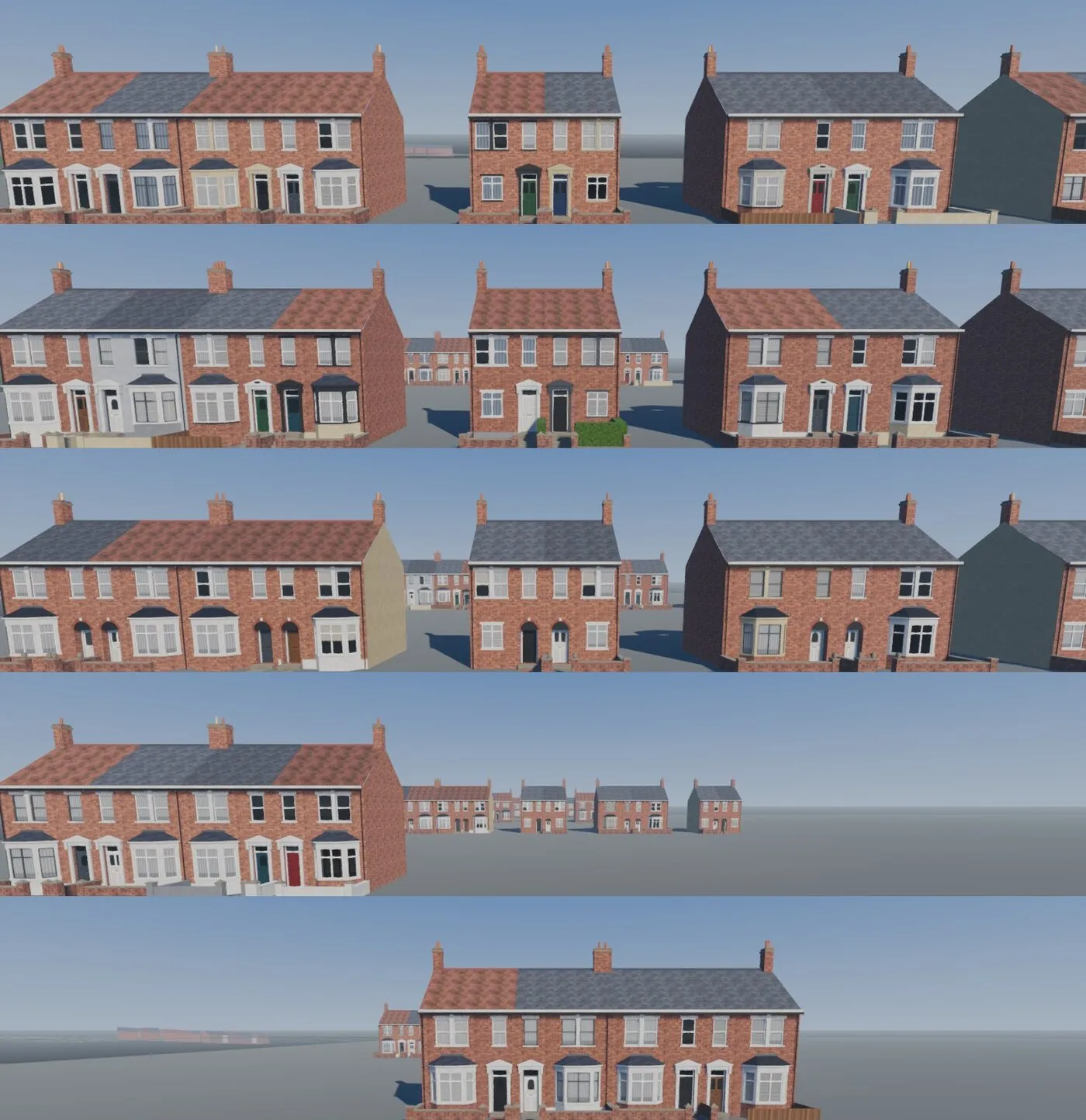
Early on, streets looked either cloned or random. What fixed it was making choices at three levels, the way these streets actually came about:
Terrace groupA run of joined houses shares one design, in mirrored pairs, because that's how a builder put them up.
HouseEach house then gets what its owners have done since, like paint, new windows or a front wall.
SurveyWhat the photos actually show wins over both, so a real house is never overruled by a rule.
The code-built parts only go so far, though: simple boxes for doors, bays and mouldings, and flat brick. So my next step is a modular house kit in Blender, with real mouldings, glazing and materials, made by a script so it can be rebuilt at any time.
I have no modelling background, which is why the script suits me. I never move a vertex. My part is spotting what looks wrong, finding a photo that shows what’s right, and turning it into a rule that then applies to every house on the street.
I set the kit out like a laptop range: a slim base terrace with no bay and no decoration, then wider ones with square bays, bays on both floors, and rounded bays.
I also tried an AI image-to-3D generator. It got a house’s overall shape in seconds, but the fine detail melted and the whole house shared one blurry texture. I wanted clean, sharp, defined shapes, so I dropped it.
I set one rule before starting: the kit had to fit the game as it already was. Every part sits exactly where the game puts its code-built version, so a Blender bay or porch can simply swap in. The test scene lays out sixteen block types, from plain terraces to bow-fronted pairs.
Most of the kit’s rules came from catching something that looked wrong in a screenshot:
No ledgesAn early test house had a ledge that would only collect dirt on a real one. Now every piece overhangs the one below, and any sill or plinth slopes so water runs off.
Brick and slateI wanted walls with real depth that cost the same on one house or a hundred, so the depth is faked in the material. Each brick is a slightly different colour so you don't spot the pattern repeating.
Front gardensGardens stretch to fit whatever space the plot gives, but the gate always lines up with the front door, because that's what you'd notice if it didn't.
HedgesMy Blender scene got very heavy, and I had to remember this all needs to run in a game. Modelled leaf by leaf, one street's hedges came to 6.8 million triangles, so now they're a baked leafy surface with a few loose leaves for a ragged edge.
It isn’t in the game yet. I wanted to prove the workflow before touching the game.
A survey, house by house
After the port, only my own street had really been looked at. Every other house just got its street’s default type, and it showed.
The rule that started the survey came from a mistake. A shop had appeared next to my house, because OpenStreetMap tagged it as one, when it’s really a house with a business run from it. From then on, what the photos show always beats the map data.
My first question was what each Street View picture would cost. At this scale the free allowance covers every house on the map, so I went for one straight-on picture per house.
Each picture is described in plain words (bay, door, colours, roof, front boundary), then turned into kit parts. Anything the kit can’t build yet is ranked by how many houses have it, so the survey doubles as a prioritised backlog. Rooflights, front gables, dormers and door canopies came first.
For roofs and rear wings I also wanted bird’s-eye views, without breaking the licence on Google’s 3D tiles. So they’re only looked at, never traced. So far 1,475 houses across 21 streets have been read this way.
Plot lines from HM Land Registry’s open data move the walls between houses onto the real boundaries, which puts the gaps between terraces in the right places.
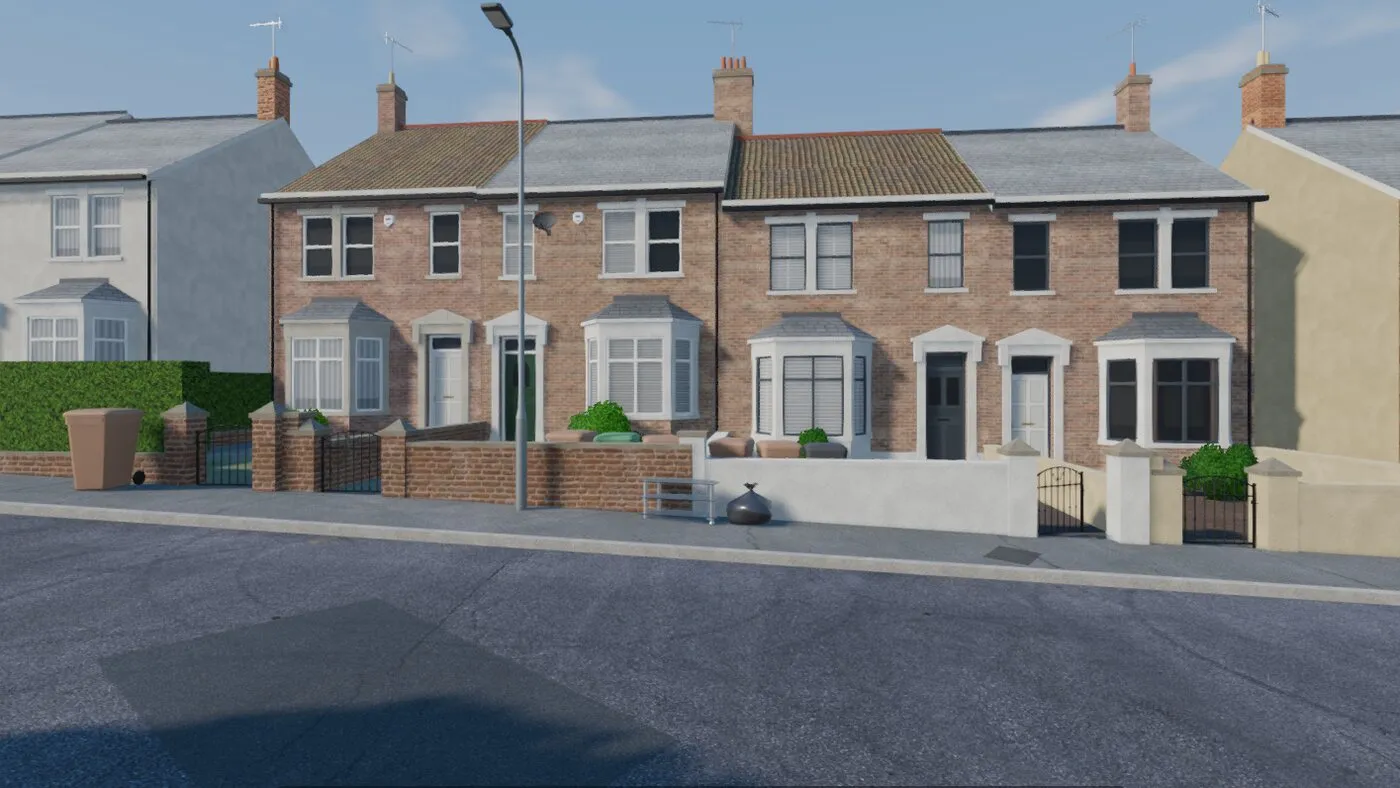
Before: the street dressed by its default rule.
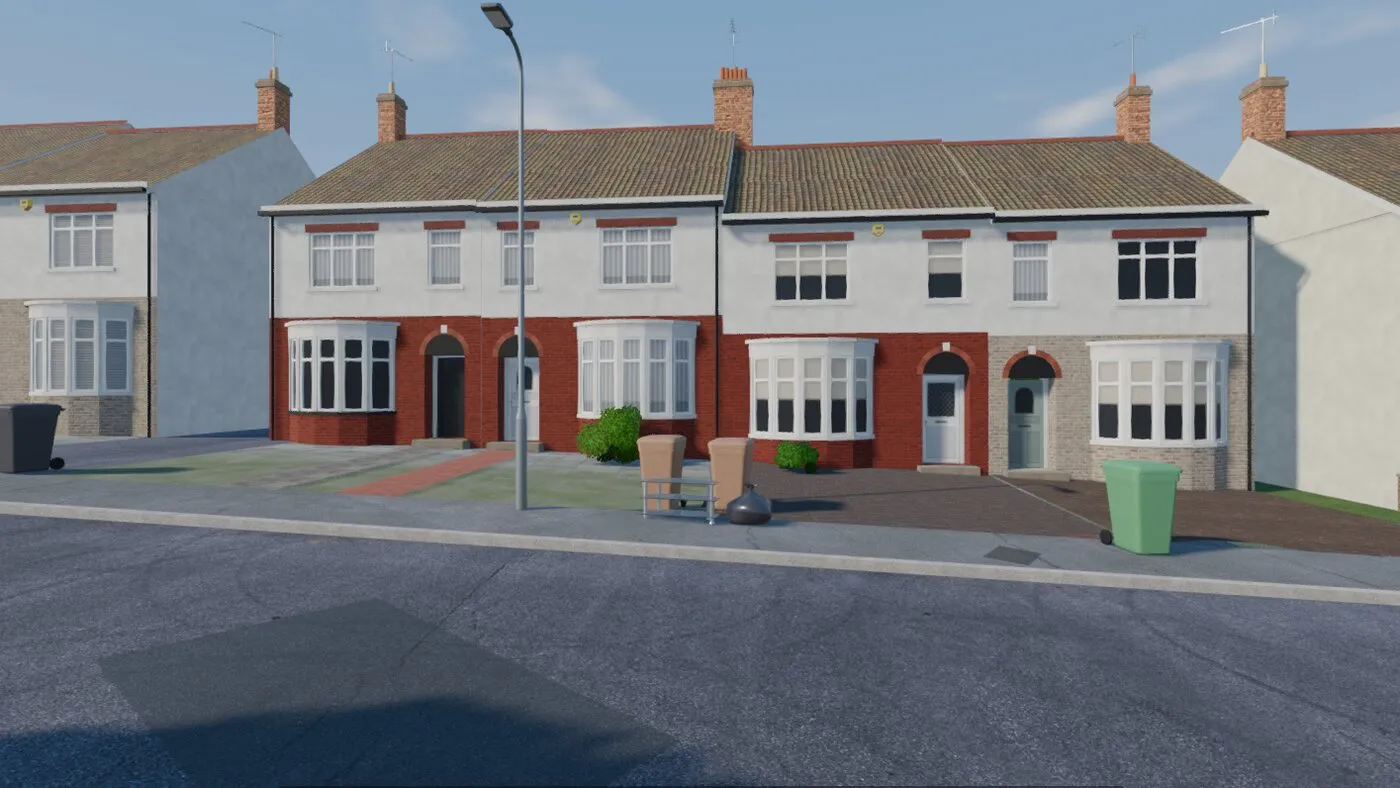
After: dressed house by house from the survey.
Surfaces follow rules too. Tarmac changes where a length was resurfaced or a trench dug, and bricks are chosen per terrace group, so most of the Edwardian houses on my road share the same red brick, like the real ones. The first grass looked chunky and crept onto the pavements, so I made it thinner and kept it to the verges and gardens.
Weather
A street you know looks different every day, and I wanted the game to feel like that rather than sit under one fixed sky. So I didn’t build weather as a set of scenes. Each kind, from sunny to foggy, is just a handful of settings the game can blend between.
It drifts on its own every few minutes, and the changes follow the order real weather does: rain clears to overcast or cloud, never straight to sun. I can also skip the clock and the weather by hand, which is how I check a street at any hour.
Most of what’s in it came from playtesting and noticing what felt off:
SunI wanted shadows to fall the way they do outside, so the sun sits where it really would over the street at that time and date. A whole day passes in under an hour.
CloudOn a cloudy day a passing cloud dims the sun now and then, so the light keeps changing as you drive.
FogIt's clear close to and thickens with distance until the sky is lost too, so a foggy walk feels close and quiet.
RainAt first you couldn't see the rain at night at all. Now it's grey by day, and after dark it only shows where light falls through it, under a lamp or in the headlights.
WetMy first rain only left random puddles, but a real street goes shiny all over. Now the ground soaks up the wet and dries slowly, the tarmac darkens and reflects, and the car loses some grip.
NightEarly nights looked washed out, with the houses not sitting in the scene. Now there's a moon and stars, street lamps that really light the road, headlights, and a share of windows lit for the hour.
Water also pools where the road’s camber would send it: along the gutters, in dips and in potholes. The car knows where the puddles are too, so a tyre that looks like it’s in water throws a splash.
Lamps and headlights glowing in the air were the most expensive effect, so I only switch it on after dusk and in rain or mist, when you’d actually notice it.
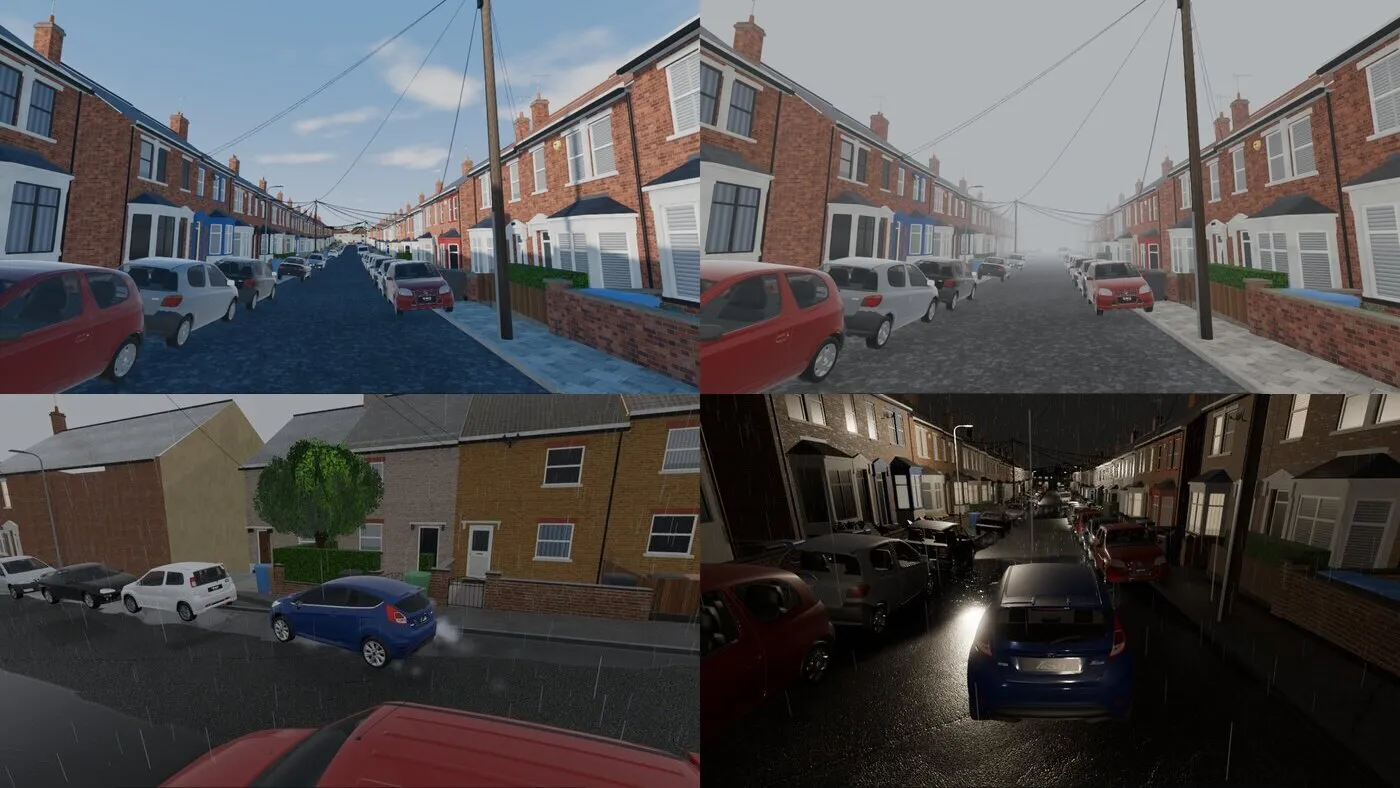
Sun, fog, rain and a wet night.
Making it feel right to drive
I wanted you to be able to get into any parked car and have it feel snappy and fun, the way GTA cars do.
My first Godot car turned “like a giant ship”, struggled round tight corners on full lock and lost speed on every swerve of a slalom. None of that is the handling I was after.
So I looked at how GTA San Andreas handles it and wrote my own version of the same idea: each tyre has a limit, and once you push past it the car slides until it recovers. Slides last long enough to catch, which is where the fun is.
On top sit a couple of quiet driving aids: extra grip at low speed, so a tight junction can be taken briskly, and a stability aid that only steps in when you’re going fast. Each one is a single setting, so I could tune it by feel between test drives.
The camera follows where the car is pointing rather than where it’s travelling, so you can see a slide happening. A scripted test track checks turning, braking and street corners, so a change that feels better is also measured.
Playtesting turned up smaller things too. Clipping a wall at speed brought the car to a dead stop, so now it glances off and scrapes along instead. The electric car was quietly running on made-up petrol gears, so I gave it its real motor. All the sound is synthesised live.
Things you can knock over
Knocking things over was one of the first things I added, a couple of hours into the first build. A GTA street is fun because things react when you mount the kerb. The catch is that a street has hundreds of poles, bins and post boxes, and simulating them all would cost far too much.
So they sit there as cheap copies until something hits one hard enough. Only then does that one become a real physics object, with the size and weight of the real thing.
I didn’t script any of the falls. The car gives each object a push at bumper height and the physics does the rest, so because each one has its real weight, they all behave differently:
Poles and lampsAt first they fell as if hanging on a string, then rolled around. Giving them a heavy head fixed it: the foot gets knocked out, the head hangs back, and the whole length comes down on whatever's in the way.
Post boxesThey're a third of a tonne of cast iron, so they shear off at the foot, go over backwards and skid rather than fly.
BinsThey weigh almost nothing, so they tumble ahead of the car and you can hit them again and again.
Bin dayI added what people actually leave out on collection day. A black sack gets shoved along by a slow car and bursts under a fast one, a box just flies, and a glass TV stand shatters and leaves its legs rolling in the road.
The car models in these screenshots and clips are temporary stand-ins used for private testing. I’ll replace them with properly licensed models once the project is further along.
Where it started
The first version was a browser build in three.js, and it still owns the data pipeline: building footprints, roads and trees from OpenStreetMap, terrain from the Environment Agency’s LIDAR, and roof colours and tree cover from a satellite pass.
Many of the rules that make it read as a real place were worked out there, like cars parked half up on the pavement but never on bends, and floors set from the ground at each front door so terraces step down a hill.
The port taught me to keep checking the game against the street. A telegraph pole near my house that was right in three.js landed in the wrong place in Godot, so I had every placement checked against the street pictures again.
The Godot version is the port of all that, rebuilt to stream a whole neighbourhood instead of one street.
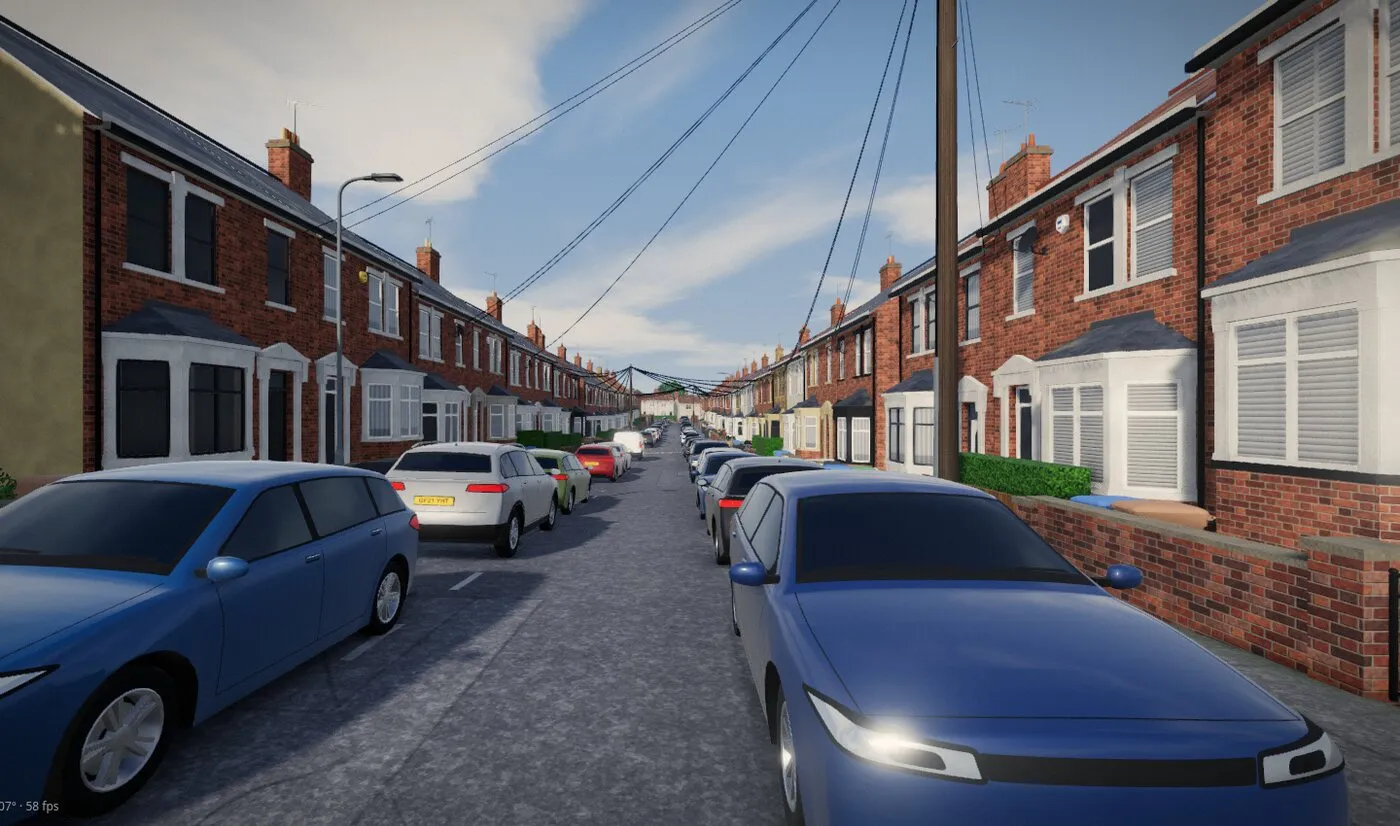
Where it’s at
You can walk and drive the whole map, and I keep a clear list of what’s missing: shop signs, street name plates, the walk-in shop from the three.js version, roof alterations, dents and loose panels on the cars, and most road markings.
Back gardens are the thing I pulled. Generated plots came out jagged, ignored the alleys that run behind and between the terraces, and looked nothing like the real ones when I traced a few over the map to compare.
Rather than keep tuning rules that weren’t working, I took plots and garden fences out until there’s a better way to lay them out by hand.
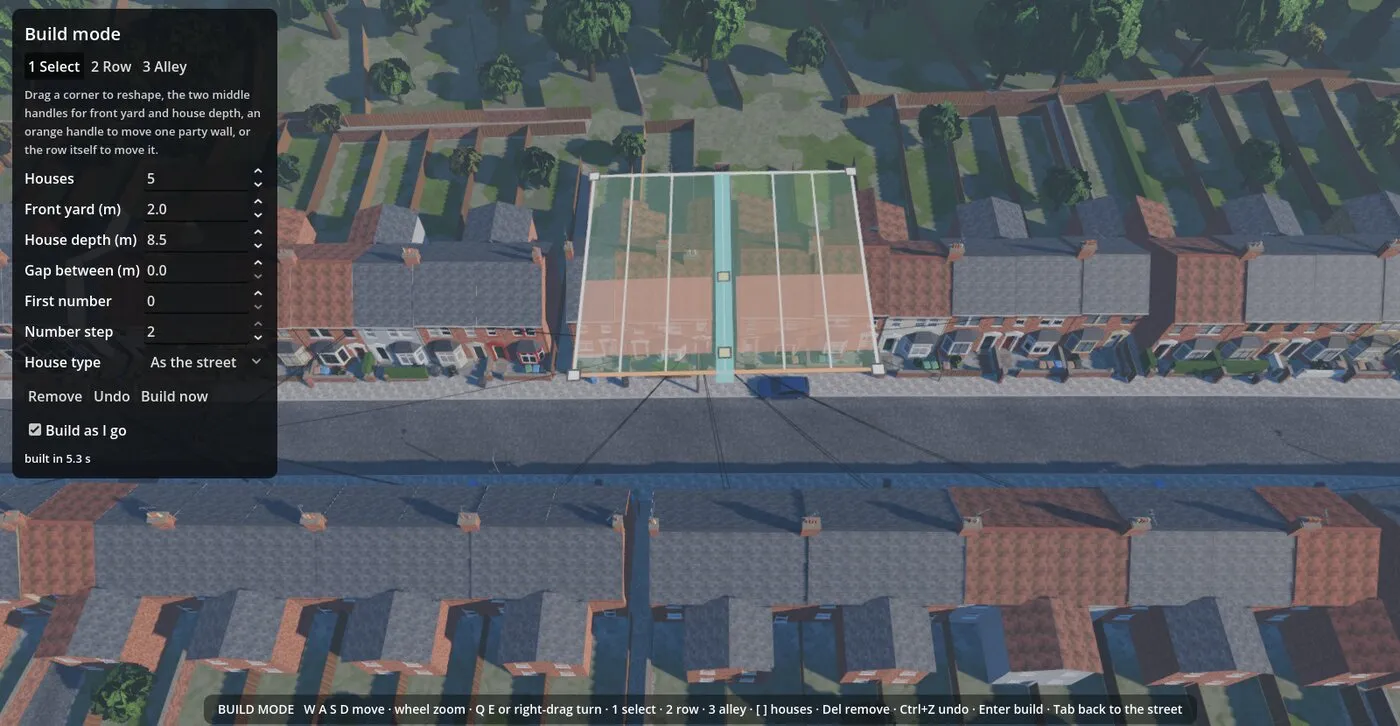
The start of that is an in-game build mode. You draw a row of houses from above in three clicks, drag handles to set the front yard and house depth, and that part of the map rebuilds in a few seconds. The plan is to turn it into the tool for drawing garden boundaries.